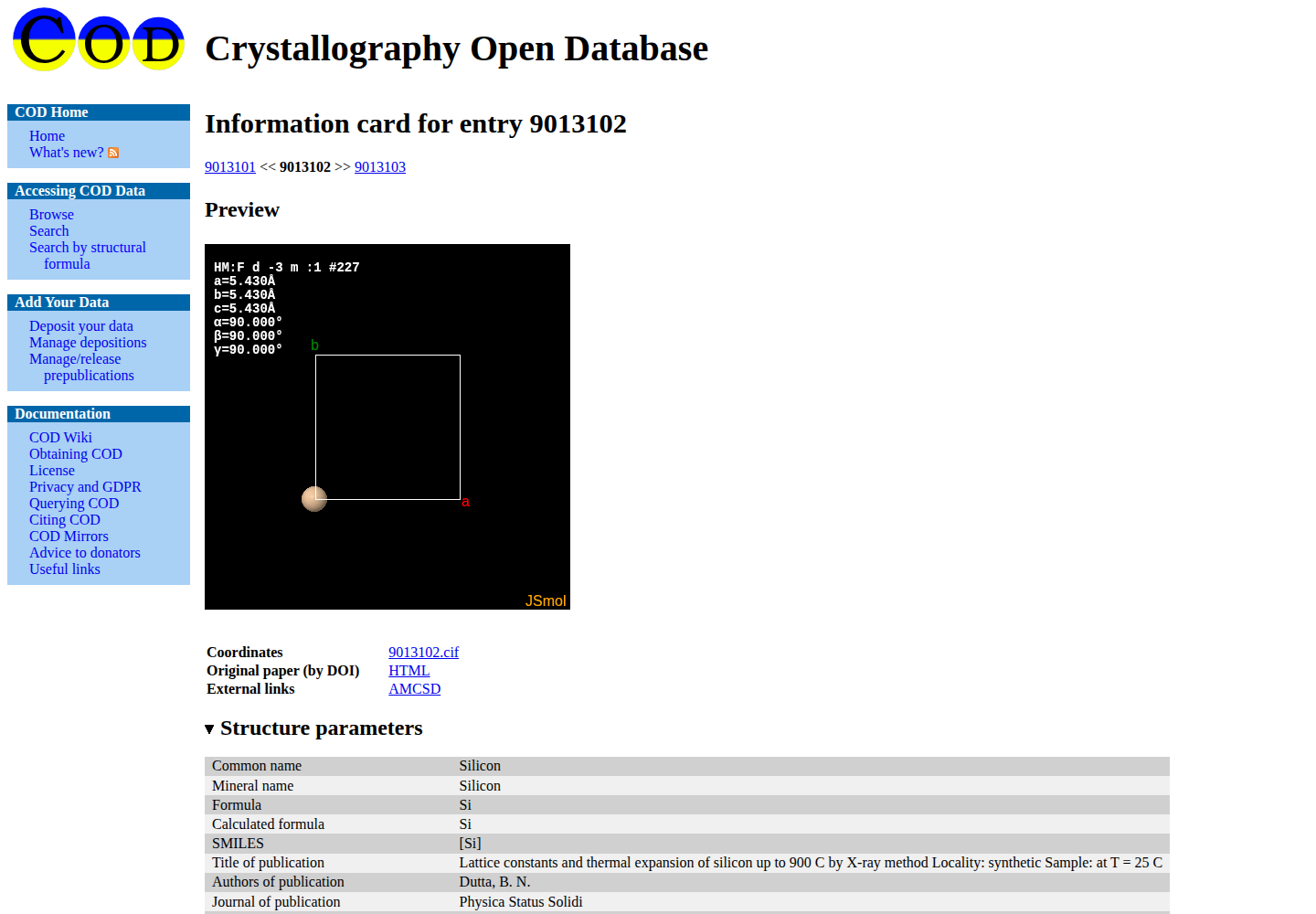
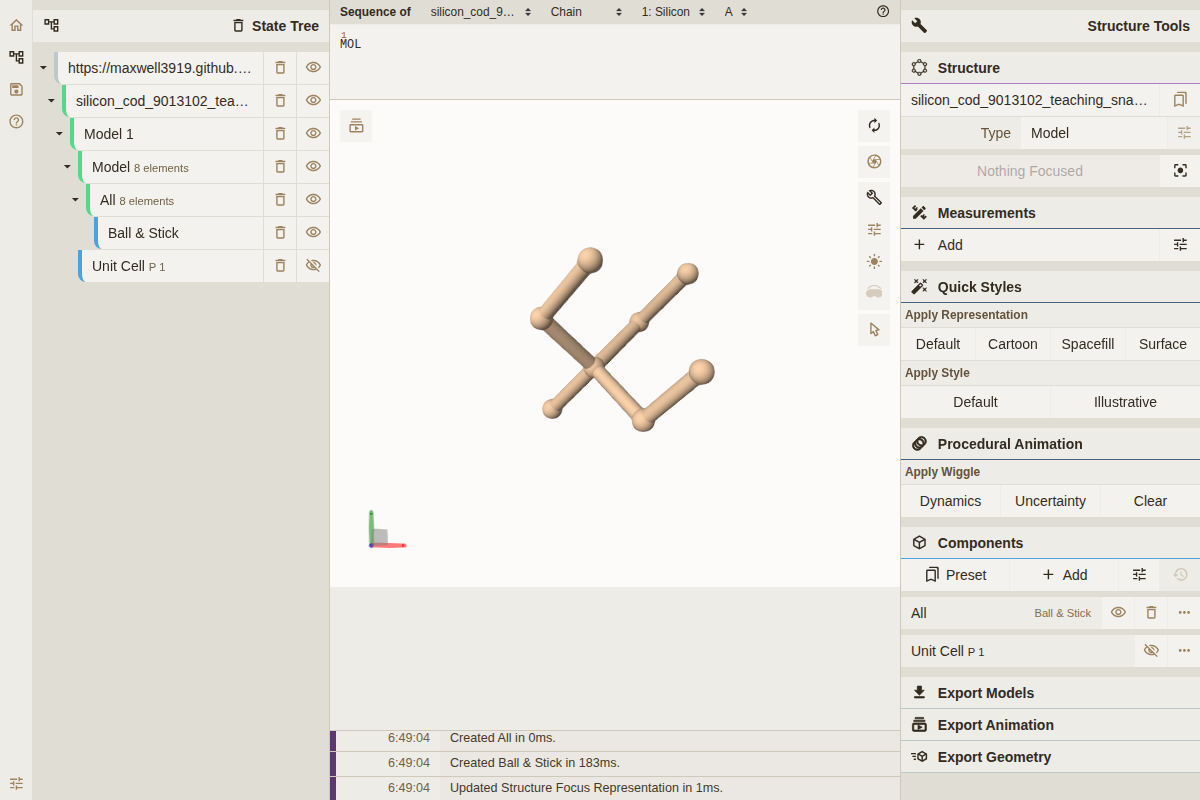
Start with the database record, not a detached file
Open COD entry 9013102. Confirm the entry number, formula, common name, unit-cell parameters, space group, publication record, and version history before downloading anything. These fields identify what the database says the record represents; they do not prove that it is the correct phase or model for a calculation.
Use the Coordinates link labelled 9013102.cif. Before leaving the record, create a short source note from what you actually read. Do not infer a temperature, pressure, phase, or disorder model from the formula alone.
Record ID: COD 9013102
Record URL: https://www.crystallography.net/cod/9013102.html
Access date: YYYY-MM-DD
Downloaded filename: 9013102.cif
Publication: copy the DOI or citation shown on the record
Reported conditions: copy temperature, pressure, and sample notes, or write not reported
Unresolved questions: phase / occupancy / disorder / provenance / none yet
Keep the downloaded file unchanged. A checksum fixes those bytes; it does not establish phase identity or scientific suitability.
The Visual reference section on this page includes an actual capture of the public COD record. Use it to locate identity, coordinates, structure preview, and publication metadata. The capture proves only what the interface displayed on 2026-08-10.
Create the source and working files
Assume the browser saved the file as $HOME/Downloads/9013102.cif. Change only DOWNLOAD if your browser used another location. The source/ copy remains unchanged; conversions belong under working/.
mkdir -p structures/si-cod-9013102/{source,working,records}
cd structures/si-cod-9013102

DOWNLOAD="$HOME/Downloads/9013102.cif"
test -s "$DOWNLOAD"
cp -- "$DOWNLOAD" source/9013102.cif
cp -- source/9013102.cif working/9013102-as-downloaded.cif

file source/9013102.cif
head -n 8 source/9013102.cif
sha256sum source/9013102.cif | tee records/SHA256SUMS
file and head must show text that begins like a CIF, not HTML from an error, login, or rate-limit page. Run nano records/source-note.txt, enter the source note above, and save it; include the checksum output rather than copying a hash from this page.
Read the exact CIF before converting it
Open source/9013102.cif in a text editor. Locate the data block, cell lengths and angles, space-group fields, atom-site loop, fractional coordinates, occupancies, and uncertainty or disorder fields. Then expose the same records from the terminal:
head -n 40 source/9013102.cif
grep -n -E '^data_|^loop_|^_cell_|^_space_group_|^_symmetry_' \
  source/9013102.cif
grep -n -E '^_atom_site_(label|type_symbol|fract_[xyz]|occupancy)' \
  source/9013102.cif
grep -n -E '^_atom_site_.*(disorder|U_iso|B_iso)' \
  source/9013102.cif || true
These commands expose records; they do not validate the geometry. The repository’s hash-bound 2026-08-05 parse of the public COD copy reported the following bounded facts:
formula: Si8
atom_count: 8
cell_a_ang: 5.4304
minimum_distance_ang: 2.351432
detected_symmetry: Fd-3m (No. 227) at symprec = 0.001 angstrom
Your file may receive a different hash or upstream revision. Recalculate these facts from the file you downloaded; do not use the values above as an acceptance substitute.
Compare the text with the browser record. Stop if formula, cell, symmetry, or site population disagree in a way you cannot explain. Preserve any converted, standardized, primitive, conventional, or symmetry-expanded descendant under a new filename so that it cannot be mistaken for the download.
Open the same object in a crystallographic viewer
For the desktop route, open source/9013102.cif in VESTA with File > Open. Show the unit-cell boundary, rotate along each lattice direction, inspect periodic images and coordination, and measure suspiciously short contacts. For a slab or layered object, view along the surface normal and confirm which axis contains the intended vacuum. The VESTA documentation describes these controls. No VESTA screenshot or local VESTA execution is claimed here.
The browser-viewer capture in the Visual reference section loads this site’s expanded eight-site Silicon teaching snapshot, not the byte-for-byte COD download. Rotate it, inspect the object identity in the state tree, and compare the visible arrangement with the object you expected. Mol* documents the viewer URL/query interface. Because this object is a derived P 1 representation, it can demonstrate browser interaction and reveal an obvious display or conversion problem, but it cannot prove raw-file identity.
Viewer bonds are display heuristics. A plausible picture does not replace occupancy review, periodic distance checks, parser warnings, or tolerance-dependent symmetry analysis. If text and picture disagree, resolve the data block, symmetry expansion, disorder model, or conversion before continuing.
Convert the working copy and reopen the written child
Install a versioned structure tool in an isolated environment if ASE is not already available, then inspect and convert only the working copy:
python3 -m venv .venv
. .venv/bin/activate
python -m pip install "ase==3.29.0"

ase info --files working/9013102-as-downloaded.cif
ase gui working/9013102-as-downloaded.cif
ase convert -i cif -o extxyz \
  working/9013102-as-downloaded.cif \
  working/9013102-converted.extxyz
ase info --files working/9013102-converted.extxyz
ase gui \
  working/9013102-as-downloaded.cif \
  working/9013102-converted.extxyz
sha256sum working/* | tee records/working-SHA256SUMS
Reopen the file on disk. Compare composition, cell vectors, site count, coordinates, periodicity, minimum contacts, and visible geometry. CIF-to-EXTXYZ conversion can discard symmetry labels, uncertainties, occupancies, and publication metadata even when the represented coordinates remain usable. Keep the CIF as the provenance parent.
Decide pass, stop, or rebuild
| Observation | Meaning | Action |
|---|---|---|
| Browser record, CIF text, parsed composition/cell, and exact-file view agree | The source object is internally understandable | Preserve the records and continue to model construction |
| The browser saved HTML, an empty file, or a login/rate-limit response | Retrieval failed before crystallographic inspection | Return to the record and download again; do not rename the response as .cif |
| Occupancy, disorder, alternate blocks, or experimental conditions are ambiguous | The deposited representation needs a modelling decision | Read the paper/refinement record and keep alternatives; do not round or delete sites silently |
| Converted and source objects differ in composition, cell, site population, or geometry | The conversion is not an accepted descendant | Reject the child, inspect parser warnings and format support, and convert again under a new name |
| Detected symmetry changes with tolerance | Symmetry identity is unresolved at the numerical precision used | Preserve the tolerance sweep and use the symmetry troubleshooting route before standardization |
For unexpected cells, overlaps, broken coordination, or vacuum direction, use The geometry looks physically wrong. For primitive/conventional or operation-count mismatches, use Detected symmetry or k/q mapping differs from the intended model.
Return with an inspected source object
Bring back the unchanged CIF, stable record identity, retrieval information, checksum, publication and conditions, notes from the text inspection, notes from the exact-file visual inspection, and any unresolved ambiguity. Reopen every derived file and compare it with the source before treating it as a model parent.
Continue with Build or Modify a Computational Model only after the record, raw text, and represented geometry are mutually understandable. Model choices such as vacuum, supercell, defect, ordering, charge, or constraints belong to that next task.
What this example does not establish
This walkthrough establishes an actual browser route to a declared COD record and an actual browser viewer state for a declared expanded teaching object. It does not prove database correctness, CIF-model suitability, symmetry standardization, absence of disorder, DFT readiness, numerical convergence, energetic stability, or any Silicon property.
Optional automation: replay the recorded COD case
The transparent browser, text, and exact-file inspection above comes first. If you already have a checkout of this repository, its optional case companion can repeat the bounded COD retrieval and parse in an empty external directory.
- Reads: the recorded COD URL, case-local parser, and declared software environment.
- Produces: the downloaded public CIF copy, HTTP headers, retrieval record, parsed JSON, and checksums under the external run directory.
- Checks: HTTP completion, file identity, parseability, selected composition/cell fields, and presence of the declared artifacts.
- Does not check: phase correctness, refinement quality, disorder-model suitability, DFT readiness, stability, or any material property.
run_root="$(mktemp -d)"
CASE_RUN_ROOT="$run_root" PYTHON=python3 \
  bash examples/cases/database-cod-silicon/run.sh
cd "$run_root"
bash check.sh
python3 -m json.tool derived/9013102.analysis.json